
A new subscription rarely looks expensive on its own. Fifteen dollars per user, a mid-tier upgrade, an automation add-on: each decision is easy to approve because the monthly number is small. The picture changes when those tools are viewed together, over three or four years, including the work required to keep them talking to one another.
This article is a practical way to compare a growing SaaS stack with a custom build. It is not an argument that custom software is cheaper, or that buying is a mistake. Either path can be the better one. The expensive error is comparing a single monthly invoice with a one-time development quote and calling that a cost analysis.
What a SaaS stack actually costs
List price is only the starting point. Pull the last twelve months of invoices and group the spend into a few buckets.
Seats, tiers, and add-ons. Per-user pricing grows with headcount, and the feature you actually need is often sitting in a higher plan. Storage limits, extra workspaces, premium support, and usage-based API calls often do not appear in the original quote. The same is true of integration platforms that become costly once several teams rely on them.
The glue between systems. Two or three products can look tidy. Six or seven usually require middleware, scripts, or manual exports, plus the time spent repairing a flow after a vendor changes a field name.
Unused licences and renewals. It is common to keep paying for seats that belong to people who have left, or for a second tool that was meant to replace the first one and never quite did. A short inventory against the current employee list often finds wasted spend. Many contracts also allow the vendor to raise prices at renewal, so read the clause on the order form rather than treating today’s invoice as a stable baseline.
Internal time. Someone has to administer accounts, train new hires, and reconcile reports that do not match. If that work is not on the spreadsheet, the SaaS option will look cheaper than it is.
None of this means the stack is a bad buy. For commodity work such as payroll, email, or accounting, a specialist product is usually the right answer. The question is whether the combination of tools, over several years, is still cheaper than building the distinctive part of the workflow once.
What a custom build actually costs
A development quote is incomplete if it covers only the first release.
Discovery and the build. If discovery is skipped, the build cost is not lower. It is just deferred, and it usually comes back as rework. The engineering estimate should cover only the workflows that are actually distinctive, not a recreation of every tool the company already uses.
Hosting, maintenance, and change. Servers, monitoring, backups, and security updates do not disappear because the software is yours. Business processes do not stand still either. A common planning assumption is to set aside a meaningful share of the initial build cost each year — often in the range of 15–20% — for fixes, small features, and dependency updates. If that line is missing, the custom option is understated.
The cost of being wrong. A poorly scoped build can exceed the quote or fail to replace the tools it was meant to retire. Include a margin for that risk, or plan to build in stages so the first release can be tested against a real workflow before the rest of the budget is committed.
The advantage of a custom system is that you stop paying per seat for a process specific to your business, and you can change the software when the process changes, without waiting on a vendor’s roadmap.
A four-year worksheet, not a market average
The figures below show how to line the two sides up. They are not a claim about what software usually costs; replace them with your own invoices and quotes.
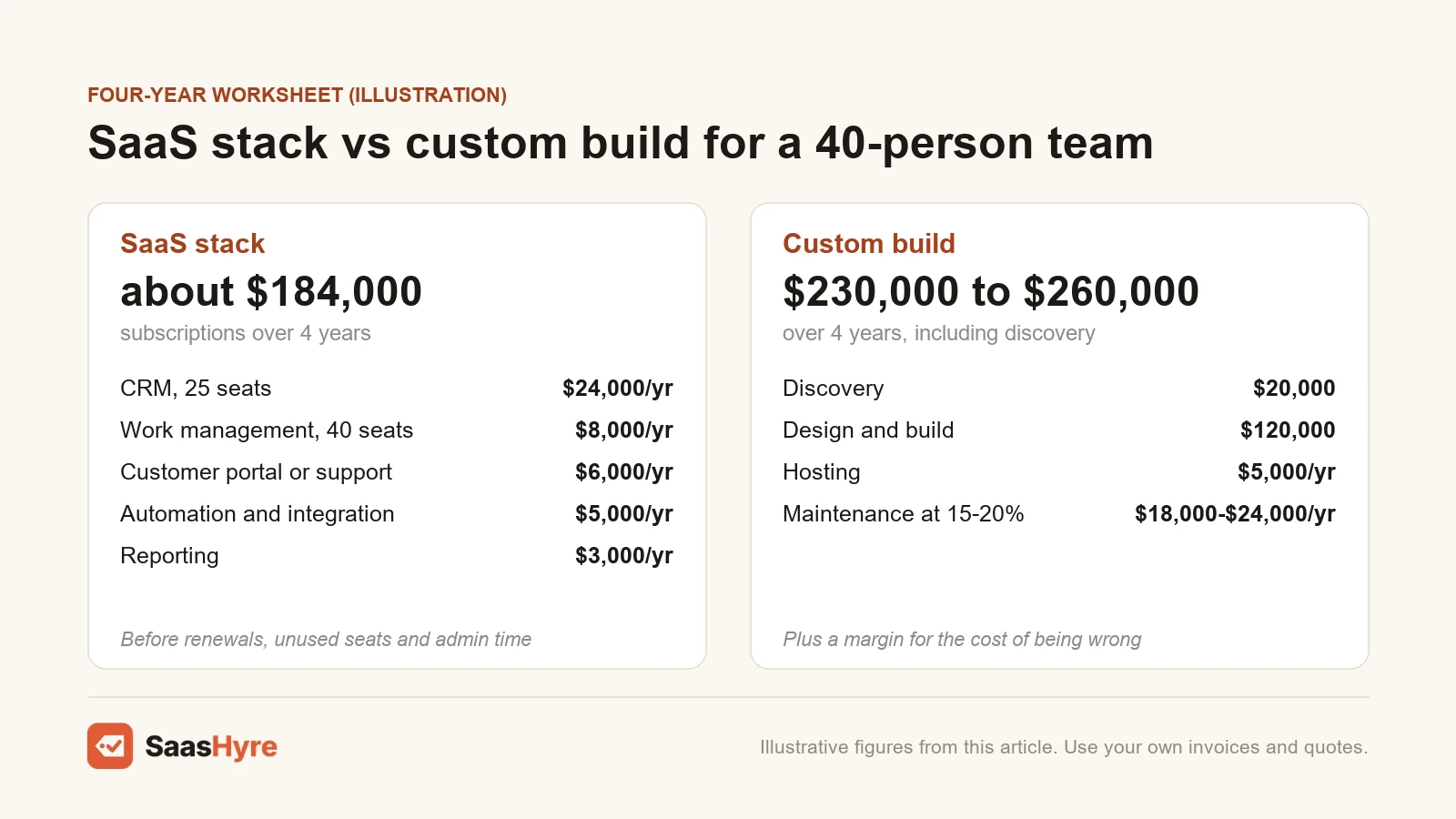
Imagine a mid-size team of about 40 people running a typical operations stack: a CRM for sales and support, a work-management tool, a customer portal, a reporting product, and an automation layer between them.
On the SaaS side, a conservative worksheet might look like this:
- CRM for 25 seats, including the plan that unlocks automation and API access: about $24,000 a year
- Work management for 40 seats: about $8,000 a year
- Customer portal or support tool: about $6,000 a year
- Automation and integration platform: about $5,000 a year
- Reporting for a smaller group of users: about $3,000 a year
That is roughly $46,000 a year in subscriptions, or about $184,000 over four years, before renewal increases, unused seats, or the salary cost of keeping the integrations running. Count any regular admin or repair time as well; even a fraction of one salary pushes the four-year total well above $200,000.
On the custom side, suppose the distinctive workflow — the customer portal, the internal process around it, and the reporting that has to be consistent — is quoted at $120,000 to design and build, after a $20,000 discovery phase. Hosting might be $5,000 a year. Maintenance at 15–20% of the build would add $18,000 to $24,000 a year. Over four years, a worksheet in that range lands around $230,000 to $260,000, including discovery.
In this illustration, the custom path is not automatically cheaper. It becomes competitive if the stack is about to grow, or if two of the subscriptions exist only to paper over a workflow that none of the tools quite fits. It looks worse if most of the stack is standard, the team is not growing, and a few integrations would close the gap.
Run the same exercise with your actual spend, over three to five years, and include only the tools a custom system would actually replace. Leave payroll and email out of both columns.
Questions that usually decide the result
These questions tend to matter more than a close dollar gap.
Is the workflow generic or distinctive? If many companies do the same thing in the same way, a product vendor can spread the cost of building it. If the process is how you serve customers or run operations differently from competitors, you are more likely to keep paying for workarounds in a generic tool.
How much work is happening between systems? If people are re-entering data, reconciling reports, or maintaining a tangle of automations, that labour belongs in the SaaS column. If the tools already share data cleanly, the case for a build is weaker.
Will headcount grow? Seat-based pricing is sensitive to hiring; a custom system is not. Teams that expect to add users or locations should look at the fourth year, not the first month.
Do you need the data in one place? Some businesses can live with exports. Others need a single record of the customer, the job, or the transaction, with a clear audit trail. The more that is true, the more a fragmented stack will cost in time and errors.
Can you start smaller? A custom project does not have to replace the entire stack at once. A first release that retires the most expensive workaround can be compared with one or two subscriptions, then reviewed before anyone funds the rest.
If the comparison still points to buying, stay on SaaS and be deliberate: cut unused seats, avoid overlapping tools, and write down who owns each integration. If it points to building, scope only the distinctive part of the process and get more than one view of the work. Reviewing how different development partners scope and price a custom build against the same requirements is more useful than comparing a single quote with a monthly invoice.
How to run the comparison in practice
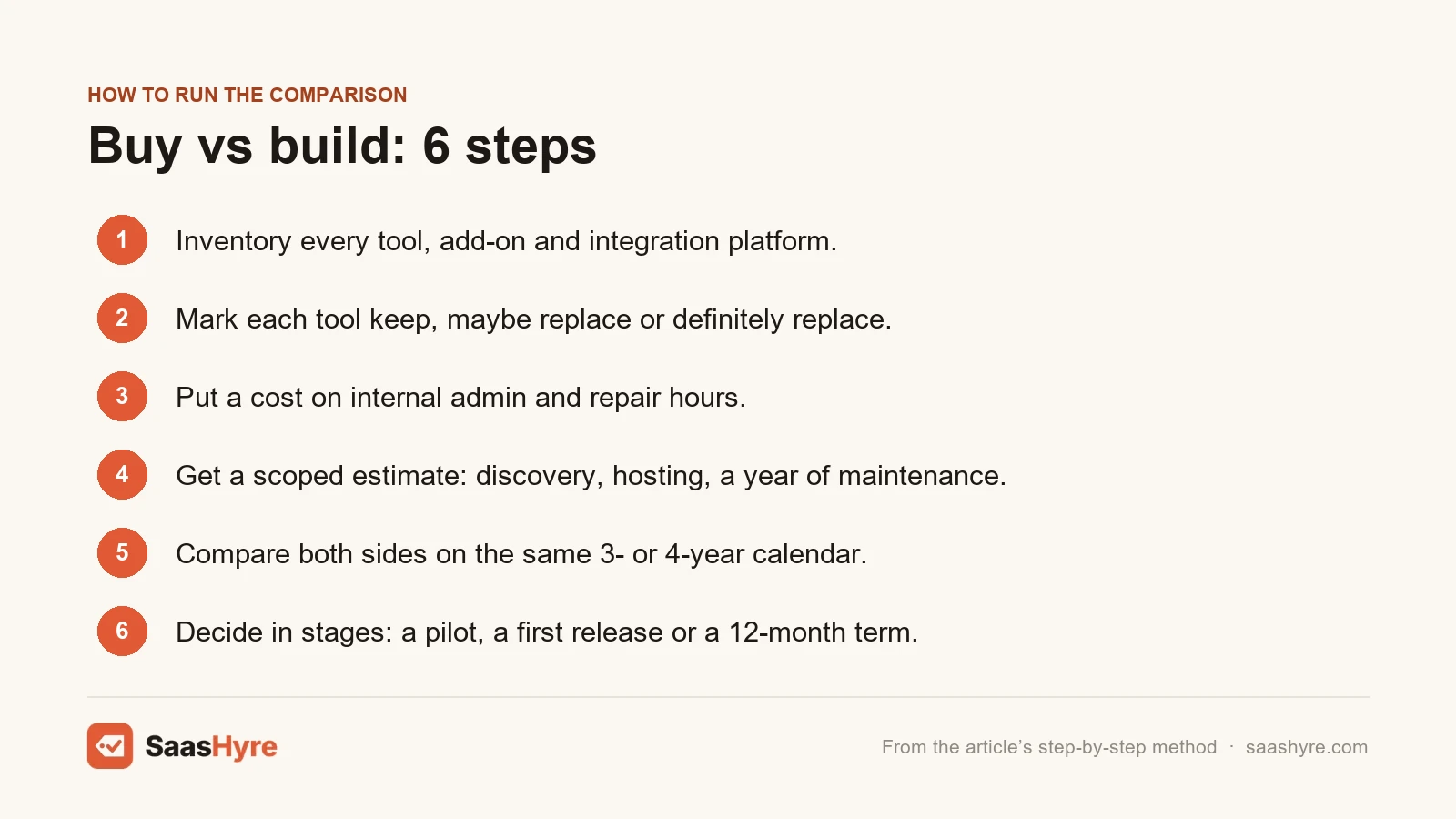
- Inventory every tool in the workflow, including add-ons and integration platforms. Note the renewal date and the current annual spend, not the homepage price.
- Mark each tool as “keep,” “maybe replace,” or “definitely replace.” Only the last two belong in the comparison.
- Estimate internal hours spent administering and repairing the current setup, and give those hours a cost.
- For the workflows you might replace, ask for a scoped build estimate that includes discovery, hosting, and a year of maintenance, not just development.
- Put both sides on the same three- or four-year calendar, long enough to see seat growth and renewals.
- Decide in stages. A pilot, a first release, or a 12-month SaaS commitment all reduce the cost of being wrong.
The bottom line
SaaS is not cheap because the bill arrives monthly, and custom software is not expensive because the quote arrives in one number. Both are multi-year commitments. The better question is not which option is cheaper today, but which will still make sense in year four, for the workflow that actually matters.
Olena Bubelo writes about software buying decisions.