
If you run a small US company, Gusto is the best AI employee onboarding software when you also need payroll. BambooHR is better if you want a fuller HR system. Pick Rippling when onboarding must also create accounts and ship laptops. If your team works away from desks, start with Connecteam. Enterprises should shortlist Enboarder, Leena AI or Workday.

Here is my advice. Don’t shop for the AI first. Ask what the tool really does for you on day one. Does it handle paperwork, accounts, or the human side of the first 90 days? Many buyers pay for an HR suite when they only needed a checklist. Others buy a slick welcome app and still make Slack accounts by hand. Gallup found that only 12% of employees strongly agree their organization does a great job onboarding new hires. So the bar is low. But the wrong tool still won’t clear it.
I took the prices and plan details below from each vendor’s own pricing page or docs in September 2026. If a vendor only gives quotes, we say so. We don’t guess.
This guide is part of our best business software series, which maps the whole small business stack.
Quick Comparison: AI Onboarding Tools at a Glance
| Tool | Best for | Starting price | Billing model | Free option |
|---|---|---|---|---|
| Gusto | Onboarding plus US payroll | $49/month + $6 per person | Base fee plus per person | No free trial listed |
| BambooHR | SMB all-in-one HR | $10 per employee/month ($250/month flat up to 25 staff) | Per employee, volume discounts | No free trial listed |
| Rippling | HR plus IT account provisioning | From $8 per user/month | Per user, modules add up | Demo only |
| Deel HR | Global and remote teams | Core from $5 per employee/month | Per employee, three tiers | Not listed |
| Connecteam | Hourly and deskless teams | $29/month for 30 users (annual) | Flat for 30 users, then per user | Free up to 10 users; 14-day trial |
| Trainual | Role training and SOPs | Quote only, plus $1,000 implementation fee | Custom | Demo only |
| Enboarder | Onboarding experience at scale | Quote only | Custom | Demo only |
| Leena AI | Enterprise AI onboarding assistant | Quote only | Per employee per year, or platform fee plus tokens | Proof of value |
| Workday | Existing Workday HCM customers | Quote only | Custom subscription | Demo only |

What Is AI Employee Onboarding Software, and What Are You Actually Buying?
AI employee onboarding software handles the steps between a signed offer and a productive new hire. That covers tax forms and e-signatures, accounts and devices, checklists for managers, and training. The AI part usually drafts content, builds ramp plans or answers new hire questions. Most tools do one of these three jobs well, not all three.
Here are the three jobs, and why they matter for your budget:
- Paperwork and payroll setup. Think W-4s, I-9s, direct deposit and offer letters. Gusto, BambooHR and Deel do this well. The data flows right into payroll or the HR record.
- Access and equipment. This means making Google or Microsoft accounts, adding people to Slack and assigning a laptop. Most “automated employee onboarding software” falls short here. This is where Rippling stands out.
- Experience and ramp. This covers welcome journeys, reminders for managers, 30-60-90 day plans and role training. Enboarder, Trainual and Connecteam focus on this job.
Onboarding is one part of your wider people tools. Planning the whole setup? Our guide to the best AI tools for HR shows where each type of tool fits.
What AI Onboarding Software Really Costs at 10, 25, 50 and 150 Employees
With 10 employees, onboarding can cost you nothing (Connecteam’s free plan) or about $250 a month (BambooHR’s minimum). With 150 employees, the gap grows to roughly $230 versus $1,500 a month. Per-employee pricing looks tiny on a pricing page. But it adds up fast once you multiply it out.
Most reviews list starting prices and stop there. That doesn’t help you when the bill depends on headcount, base fees and minimums. The table below does the math with list prices only. These are monthly numbers before taxes, discounts or add-ons.
| Tool and plan | 10 employees | 25 employees | 50 employees | 150 employees |
|---|---|---|---|---|
| Connecteam HR & Skills Advanced (annual) | $0 (free plan) | $49 | $79 | $229 |
| Deel HR Core | $50 | $125 | $250 | $750 |
| Gusto Simple | $109 | $199 | $349 | $949 |
| Gusto Plus | $200 | $380 | $680 | $1,880 |
| BambooHR Core | $250 | $250 | $500 | $1,500 |
| BambooHR Pro | $250 | $250 | $850 | $2,550 |
| Rippling (floor only) | $80+ | $200+ | $400+ | $1,200+ |
Here is what this table tells you that a feature list won’t:
- Gusto includes payroll in that price. So comparing Gusto Simple to Connecteam is unfair to Gusto. Connecteam’s HR hub does not run US payroll.
- BambooHR’s $250 minimum hurts tiny teams. A 10-person company pays $25 per head. At 26 people, the per-employee rate starts. BambooHR says volume discounts apply on their own as you grow. So prices for large teams may come in lower.
- Rippling’s number is a floor, not a quote. The $8 only gets you the platform. Onboarding automation, identity and access management, and device management are separate products. So expect a real quote well above that line.
- Connecteam is flat up to 30 users. After that, Advanced adds $1.50 per extra user per month on annual billing. That is why it stays cheap at 150 people.
What Makes the Best AI Employee Onboarding Software?
The best AI employee onboarding software does the job you need most, whether that is paperwork, system access or a steady new hire experience. It is priced fairly at next year’s headcount, with no surprise minimums or setup fees. Its AI answers questions from your own policies. And it pulls candidate data from recruiting without retyping.
We looked at what each tool does for you, how open its pricing is, what it costs at real headcounts, and who it truly fits. Most regret comes from minimums, add-on modules and setup fees that were not on the first quote. Test any AI assistant with your real handbook before you sign.
Best AI Onboarding Software for Small Businesses
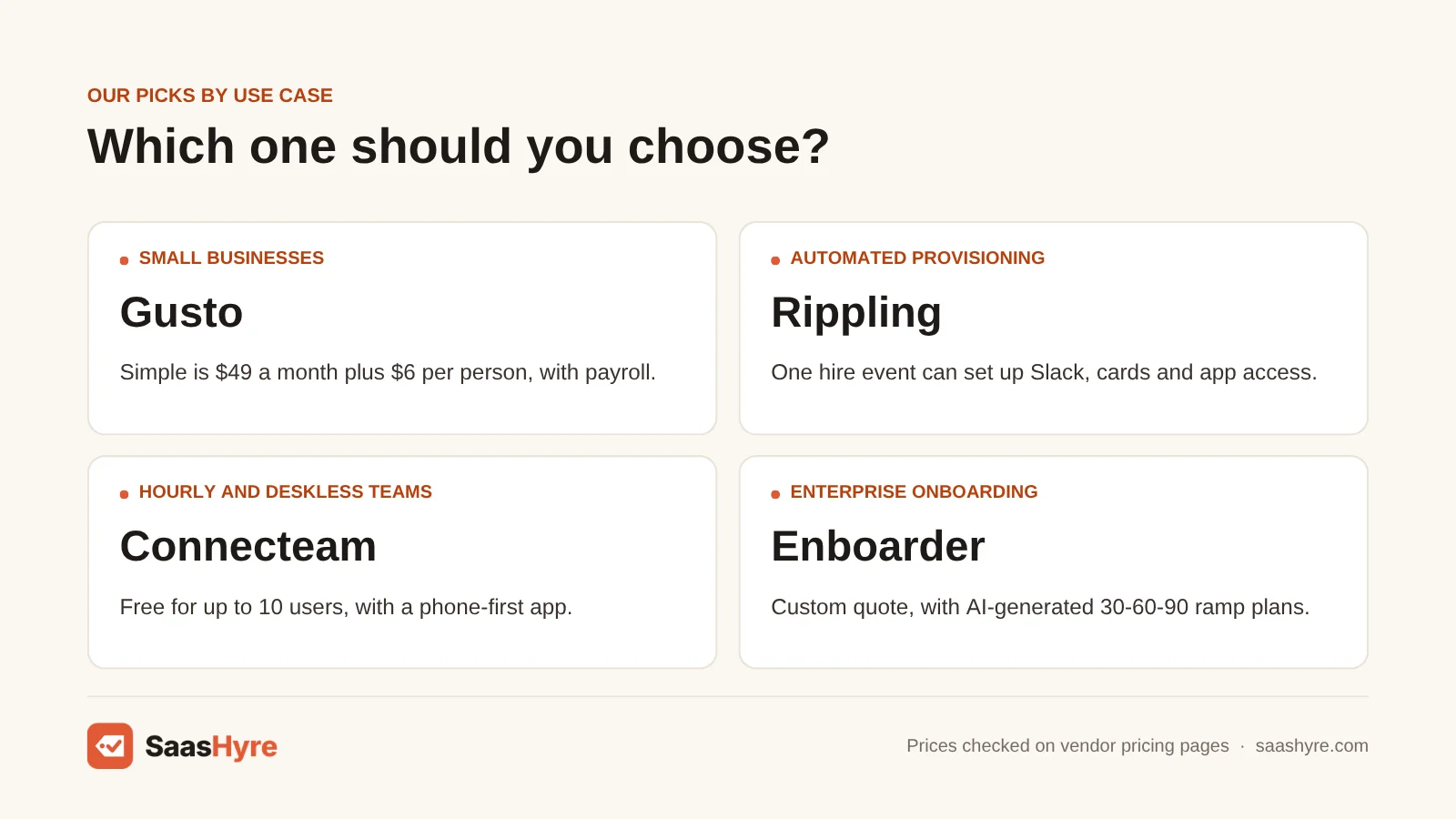
If you run a US company with fewer than about 100 people, pick Gusto if you need payroll anyway. Pick BambooHR if you want a proper HR system with an AI assistant. Pick Connecteam if most of your people work shifts and are never at a desk. All three show their prices, which makes budgeting easy.
1 Gusto: Best for onboarding plus US payroll
Gusto puts onboarding and US payroll together. So new hire details flow right into the first paycheck.
What it does well. New hire details go straight into payroll. You skip the double entry that causes errors on the first paycheck. It handles paperwork well, from offer letters to tax forms. Setting up accounts in connected apps is part of the flow.
Key features:
- Custom offer letters
- New hire paperwork signed online, including W-4s and I-9s
- Custom onboarding checklists
- Creates or removes accounts in connected apps
Pricing. Gusto’s plans are Simple at $49 a month plus $6 per person, Plus at $80 plus $12, and Premium at $180 plus $22. A contractor-only plan is $6 per person. Gusto shows its base fee as $0 right now on a limited-time offer. It is normally $35. No free trial is listed.
Best for: You, if you run a US small business and want onboarding and payroll on one bill.
Limitations. Gusto’s hiring page does not show which features come with which plan. So check before you buy. It is not a fit for hiring abroad. Its onboarding is solid admin work, not an experience platform with deep journey design.
2 BambooHR: Best for SMB all-in-one HR
BambooHR is an easy HR system. It has strong onboarding and an AI assistant on every plan.
What it does well. Pre-onboarding lets people finish paperwork before day one. You can tailor new hire packets by role and work mode. For onboarding, the Pro-level AI assistant is the one to get. New hires mostly ask policy questions, and it can answer them.
Key features:
- Custom new hire packets and pre-onboarding
- E-signatures and task checklists, with reminders
- “Get to Know You” welcome emails
- Built-in I-9 and E-Verify workflows
Pricing. BambooHR lists Core at $10, Pro at $17 and Elite at $25 per employee per month, with volume discounts. If you have 25 or fewer people, you pay a flat $250 a month. Core’s AI answers questions about your HR data. Pro adds answers from company policies and documents. Elite adds benchmark analysis. No free trial is listed.
Best for: You, if you want an easy HR system your managers will really use, with onboarding done well.
Limitations. If you have fewer than 15 people and only need onboarding, the $250 minimum is steep.
3 Connecteam: Best for hourly and deskless teams
Connecteam runs onboarding and training from a phone app. It is built for staff who never work at a desk.
What it does well. Onboarding documents, forms and courses go right to the phone. That matters when your new hires are cleaners, drivers or retail staff. The AI course creator turns your material into a training course fast.
Key features:
- Mobile app for deskless workers
- Onboarding documents and forms right on the phone
- Training courses
- AI course creator on Advanced and above
Pricing. The HR & Skills hub costs $29, $49 or $99 a month billed annually ($35, $59 or $119 month to month). Each tier covers your first 30 users. After that, you pay per user. The Small Business Plan is free for up to 10 users, with all hubs and features. There is a 14-day trial, and you need no card.
Best for: You, if your hourly or deskless workers need onboarding and training in their pocket.
Limitations. It does not cover payroll, benefits or IT setup.
Best for Automated Provisioning and Global Hiring
Does “automated onboarding” mean a new hire’s laptop, email, Slack and app access are ready on day one, with no IT tickets? Then Rippling is your strongest choice. If you hire across borders, Deel handles contracts, compliance and onboarding in one place. Both cost more once you add the modules you really need.
4 Rippling: Best for HR plus IT account provisioning
Rippling gets a new hire’s laptop, email, Slack and app access ready on day one, with no IT tickets.
What it does well. One hire event can add the person to Slack, issue a company card and set up app access. Rippling says it can onboard employees and contractors in 90 seconds. It connects to 500+ apps.
Key features:
- Automates onboarding and offboarding
- Identity and access management
- Device management
- 500+ app integrations
Pricing. Rippling starts at $8 per user per month. Everything else is an add-on product on top of the required platform. Full automation usually combines onboarding, identity and access management, and device management. You can only get a demo.
Best for: You, if you run a growing, tech-heavy company where IT setup is what really slows onboarding.
Limitations. The modules add up. You will need a quote, since there is no public price list. Rippling has AI features, but the pricing page does not say what they cost. So ask.
5 Deel HR: Best for global and remote teams
Deel handles contracts, compliance and onboarding in one place. It is built for teams that hire across borders.
What it does well. Deel’s own recruiting tool moves candidates right into onboarding inside Deel. Its AI drafts policies, job descriptions and training courses. Higher tiers add performance, learning, workforce planning and pay.
Key features:
- Recruiting that flows into onboarding
- AI that drafts policies, job descriptions and training
- Employer of Record for staff abroad
- Contractor management
Pricing. Deel HR Core starts at $5 per employee per month. Advanced and Elite tiers cost more. Do you employ people abroad through Deel? Then EOR is $599 per employee per month and contractor management is $49 per contractor.
Best for: You, if you have staff or contractors in several countries.
Limitations. It costs more once you add the modules you need. If your whole team is in one US state, Gusto or BambooHR will feel simpler.
Best for Onboarding Experience, Training and Enterprise
Once you pass a few hundred hires a year, the problem is no longer paperwork. It is making every manager run the same first 90 days. Enboarder builds AI ramp plans and journeys. Trainual turns how you work into assigned training. Leena AI answers new hire questions at scale. Workday suits companies already on its HCM.
6 Enboarder: Best for onboarding experience at scale
Enboarder builds AI ramp plans and journeys. That way every manager runs the same first 90 days.
What it does well. It creates AI 30-60-90 ramp plans and gives new hires an AI assistant. It works on top of your HRIS instead of replacing it. It is built to send the manager reminders most HR systems ignore.
Key features:
- Intelligent Onboarding package
- AI-Assisted Employee Journeys
- New Hire Enablement
- AI-generated 30-60-90 ramp plans
Pricing. Enboarder does not publish prices. Every plan is a custom quote. You can only get a demo.
Best for: You, if you hire in volume and people leaving early is a known cost.
Limitations. It is one more bill on top of your HR system. If you have fewer than 100 people, the HR suites above cover your needs for less.
7 Trainual: Best for role training and SOPs
Trainual turns how your company works into assigned training for every new hire.
What it does well. Some new hires finish their paperwork but still don’t know how to do the job. Trainual fixes that. You write down roles and processes once. Then you assign them to every hire and track who finishes. On all tiers, AI helps you write docs and search your knowledge base.
Key features:
- Role and process documentation
- Assigned training, with tracking of who finishes
- AI writing help for documentation
- AI knowledge base search
Pricing. Trainual’s pricing page lists Core, Pro, Premium and Enterprise tiers but no dollar amounts. It mentions a $1,000 setup fee.
Best for: You, if new hires ramp up slowly because your processes are only in people’s heads.
Limitations. It does not handle forms, e-signatures or payroll.
8 Leena AI: Best for enterprise AI onboarding assistant
Leena AI answers the same new hire questions over and over, across HR and IT, at enterprise scale.
What it does well. You license its Universal Assistant per employee, with unlimited use. The cost per head drops as you grow. Leena says the average go-live takes about 45 days. It tests your use cases before you commit.
Key features:
- Universal Assistant with unlimited use
- AI Colleagues platform
- Answers HR and IT questions
- Proof of value before purchase
Pricing. Leena AI does not publish prices. The Universal Assistant is a flat license per employee per year. The AI Colleagues platform is a yearly fee plus charges based on token use.
Best for: You, if you run an enterprise buried in the same new hire questions across HR and IT.
Limitations. It is too much for small teams. For them, an HR assistant that knows your policies, like BambooHR Pro, covers the basics. For a deeper look, see our guide to AI HR chatbots.
9 Workday: Best for existing Workday HCM customers
Workday onboarding is one part of its HCM suite. It is built for companies that already run Workday.
What it does well. Guided tasks and learning content are tied to the employee record. If you already run Workday HCM, turning on its onboarding beats buying another tool.
Key features:
- Onboarding inside the Workday HCM suite
- Guided new hire tasks
- Learning content
- Tied to the employee record
Pricing. Workday does not publish prices. You get a custom quote through sales. You can only get a demo.
Best for: You, if you already run Workday HCM.
Limitations. Buying Workday just for onboarding is a costly, slow way to fix a checklist problem.
How to Choose: A Buyer’s Checklist
First, pick the job you need done: paperwork, access or experience. Next, price it at your real headcount for the next 18 months. Then check what the AI really does. Most regret comes from minimums, add-on modules and setup fees that were not on the first quote.
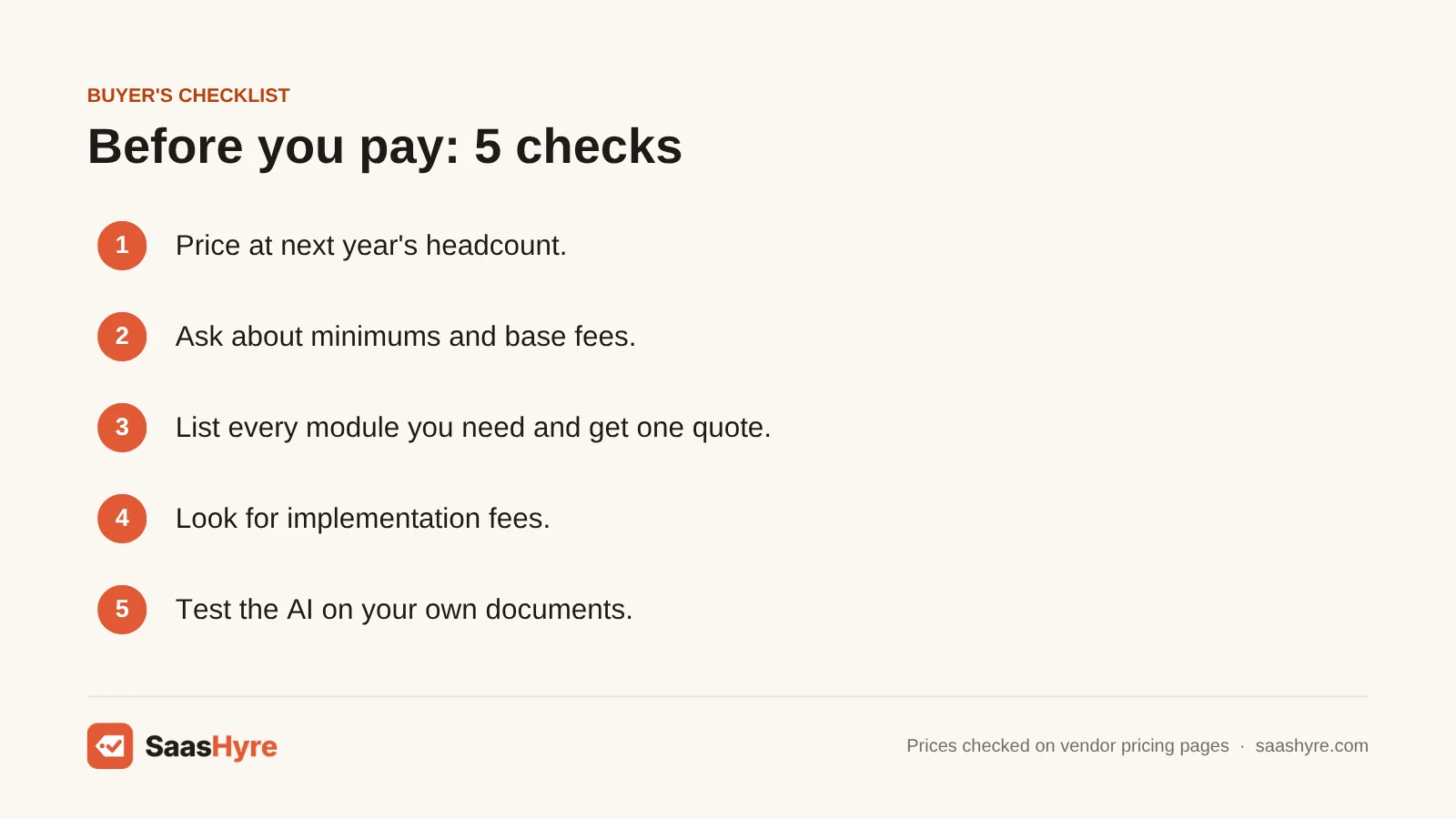
- Price at next year’s headcount. A $10 per-employee tool costs $400 a month at 40 people. At 120 people, it costs $1,200. Do the math before you sign a two-year deal.
- Ask about minimums and base fees. BambooHR’s $250 floor and Gusto’s base fee change the math for very small teams.
- List every module you need. With Rippling, onboarding, identity management and device management are separate products. Get all three on one quote.
- Look for setup fees. Trainual lists $1,000. Ask every quote-only vendor to put setup costs in writing.
- Test the AI on your own documents. An assistant that answers policy questions is only as good as the handbook it reads. Ask for a trial with your real policies.
- Check the handoff from recruiting. If candidate data doesn’t flow into onboarding on its own, someone has to retype it. Our AI recruiting software guide covers tools that connect well.
Onboarding ends around day 90. After that, goal-setting takes over. Planning that next step? See our guide to AI performance management software.
How We Evaluated These Tools
We built the shortlist from the tools that show up most in today’s top-ranking onboarding guides. Then we checked each vendor’s own pricing page and product docs in September 2026. We looked at what each tool does for you, how open its pricing is, the cost at real headcounts, and who it truly fits. We did not run our own benchmarks or hands-on tests. Features here are vendor claims from vendor pages. No vendor pays for placement. Read our editorial policy to see how we research and update guides.
The Bottom Line
If you run a US small business, Gusto gives you onboarding plus payroll for the least money. BambooHR is the better HR system if you have more than 25 people. Rippling wins when IT setup slows you down. Deel wins for international teams. Connecteam is the clear choice for deskless staff, and it starts free. At enterprise scale, book demos with Enboarder, Leena AI or your current Workday. But get every module and fee on the quote before you sign.
Frequently Asked Questions
What is the best AI employee onboarding software?
For most US small businesses, I’d start with Gusto or BambooHR. Gusto costs from $49 a month plus $6 per person, with payroll included. BambooHR costs from $10 per employee a month. Rippling is best when you need accounts and devices set up for you. Deel suits global teams. Connecteam suits hourly staff and has a free plan for up to 10 users.
What is automated employee onboarding software?
Automated employee onboarding software handles new hire steps without manual work. It sends tax forms and offer letters for e-signature, gives managers checklists, makes app accounts and delivers training. The best tools start all of this from a single hire event. So HR doesn’t retype the same details into payroll, IT and training systems.
How much does onboarding software cost?
Public prices range from free (Connecteam, up to 10 users) to $25 per employee a month (BambooHR Elite). At list price, a 50-person company pays about $79 a month for Connecteam Advanced. It pays $349 for Gusto Simple, or $500 for BambooHR Core. Enterprise tools like Enboarder, Leena AI and Workday are quote only.
Is there free employee onboarding software?
Yes. Connecteam’s Small Business Plan is free for up to 10 users, with all features. It also has a 14-day trial of paid plans, and you need no card. Gusto’s contractor-only plan shows a $0 base fee right now on a limited-time offer. You still pay $6 per person each month.
How does AI improve employee onboarding?
AI mostly saves you time in three places. It drafts onboarding content and training courses. It builds 30-60-90 day plans for each role. And it answers new hire questions from your policy documents at any hour. It does not fix a missing process. If your handbook is out of date, an AI assistant will confidently repeat the wrong answer.
Do I need a separate onboarding tool if I already have an HRIS?
Usually not if you have fewer than about 100 employees. BambooHR, Gusto, Rippling and Deel all include onboarding. A separate tool like Enboarder or Trainual makes sense when you hire in volume. It helps when your real problem is managers not following through or slow ramp time, not paperwork.