
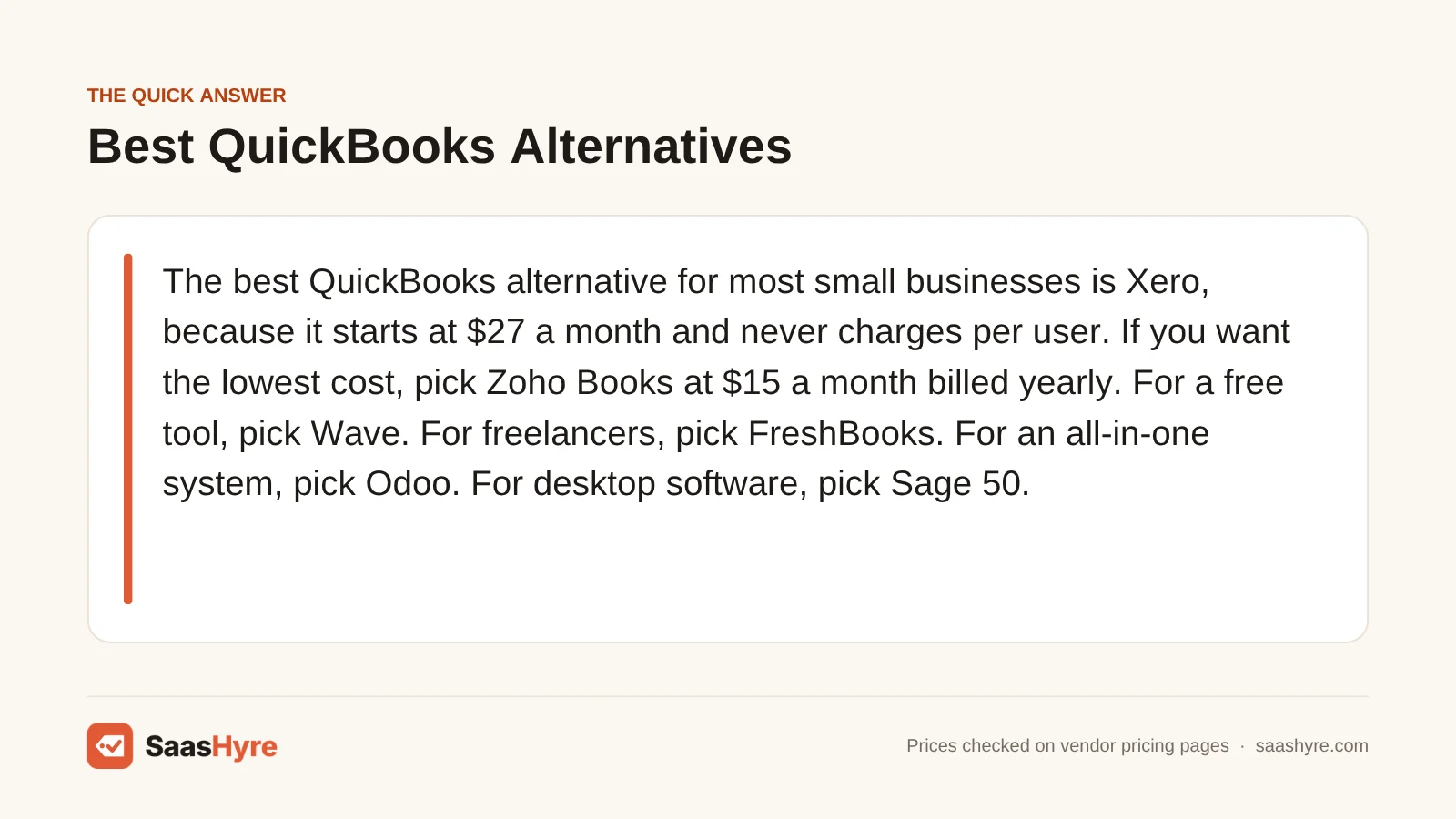
The best QuickBooks alternative for most small businesses is Xero, because it starts at $27 a month and never charges per user. If you want the lowest cost, pick Zoho Books at $15 a month billed yearly. For a free tool, pick Wave. For freelancers, pick FreshBooks. For an all-in-one system, pick Odoo. For desktop software, pick Sage 50.
Here is why so many people shop around. QuickBooks Online Plus costs $140 a month at the regular price. That is $1,680 a year for up to 5 users. The first three months are often half off, but the full price comes back after that. Most of the tools below cost less, and some give you more users for the money.
I pulled every price below from each company’s own pricing page in October 2026. I kept promo prices apart from regular prices, so you can see what you will pay after the first few months. Prices can change, so check the final price before you pay.
Building a full stack? Our small business software guide shows the best pick for every job and what it costs.
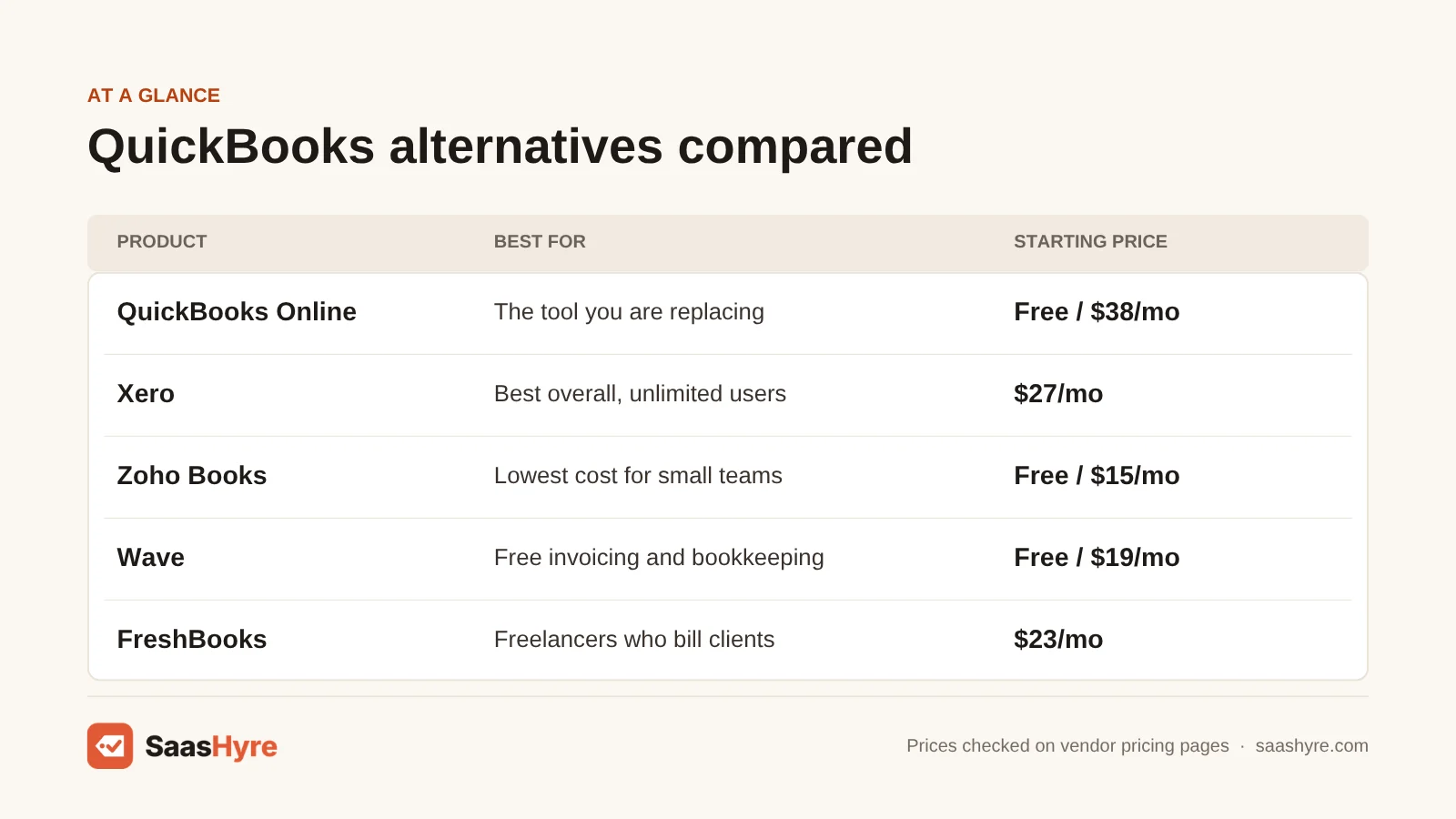
Quick Comparison: 8 QuickBooks Alternatives at a Glance
| Tool | Best for | Monthly billing | Yearly billing | Free plan or trial |
|---|---|---|---|---|
| QuickBooks Online (baseline) | What you are replacing | $38 to $340/mo regular ($19 to $170 for 3 months on promo) | Not listed | Free plan with 2 invoices a month, 30-day trial |
| Xero | Best overall, unlimited users | $27 to $97/mo regular ($5.40 to $19.40 for 3 months on promo) | Not offered | No trial listed |
| Zoho Books | Lowest cost for small teams | $20 to $275/mo | $15 to $240/mo, billed yearly | Free under $50K revenue, 14-day trial |
| Wave | Free invoicing and bookkeeping | $19/mo (Pro) | $190/yr (Pro) | Yes, free Starter plan |
| Akaunting | Open source and self-hosting | $12 to $218/mo (cloud) | $8 to $145/mo, billed yearly | Free self-hosted version |
| FreshBooks | Freelancers who bill clients | $23 to $70/mo regular | Extra 10% off | 30-day trial |
| Odoo | All-in-one business system | $31.10/user/mo (Standard) | $24.90/user/mo for the first 12 months | Free for one app, unlimited users |
| NetSuite | Fast-growing, multi-company firms | Quote only | Annual license, quote only | No |
| Sage 50 | Desktop accounting | $128.67 to $271.17/mo | One-year commitment required | No trial, 30-day refund |
Why People Look for a QuickBooks Alternative
Most people switch because of cost and user limits. QuickBooks Online runs from $38 to $340 a month at regular prices, and each plan caps users. Simple Start allows 1 user, Essentials 3 and Plus 5. If you need more people, a cheaper plan or a tool that runs on your own server, another tool may fit better.
QuickBooks is still the tool most US accountants know, so think about that before you leave. But the promo price can fool you. The 50% off lasts 3 months. After that, you pay the full rate.
Two other changes push people to look around. First, Intuit stopped selling new US subscriptions to QuickBooks Desktop Pro Plus, Premier Plus and Mac Plus after September 30, 2024, according to Intuit’s own support community. If you want desktop software, you need to look elsewhere. Second, Intuit launched a free QuickBooks plan in September 2026 (TechRepublic). It is very limited. You get 1 user, 2 invoices a month, 1 bank account and 3 reports. Many of the tools below give you far more for free.
What Makes the Best QuickBooks Alternative?
The best QuickBooks alternative does your core bookkeeping well and costs less for the users you need. Check five things. What do you pay after any promo ends? How many users come with the plan? Does it connect to your bank? Will your accountant use it? And can you move your QuickBooks data into it?
We checked each tool on those points using its own pricing page. Many top reviews still list old prices, like Xero at $20 or FreshBooks at $21. None we read cover the new QuickBooks Free plan, and few split promo from regular prices. We fix those gaps below.
Best Overall QuickBooks Alternative
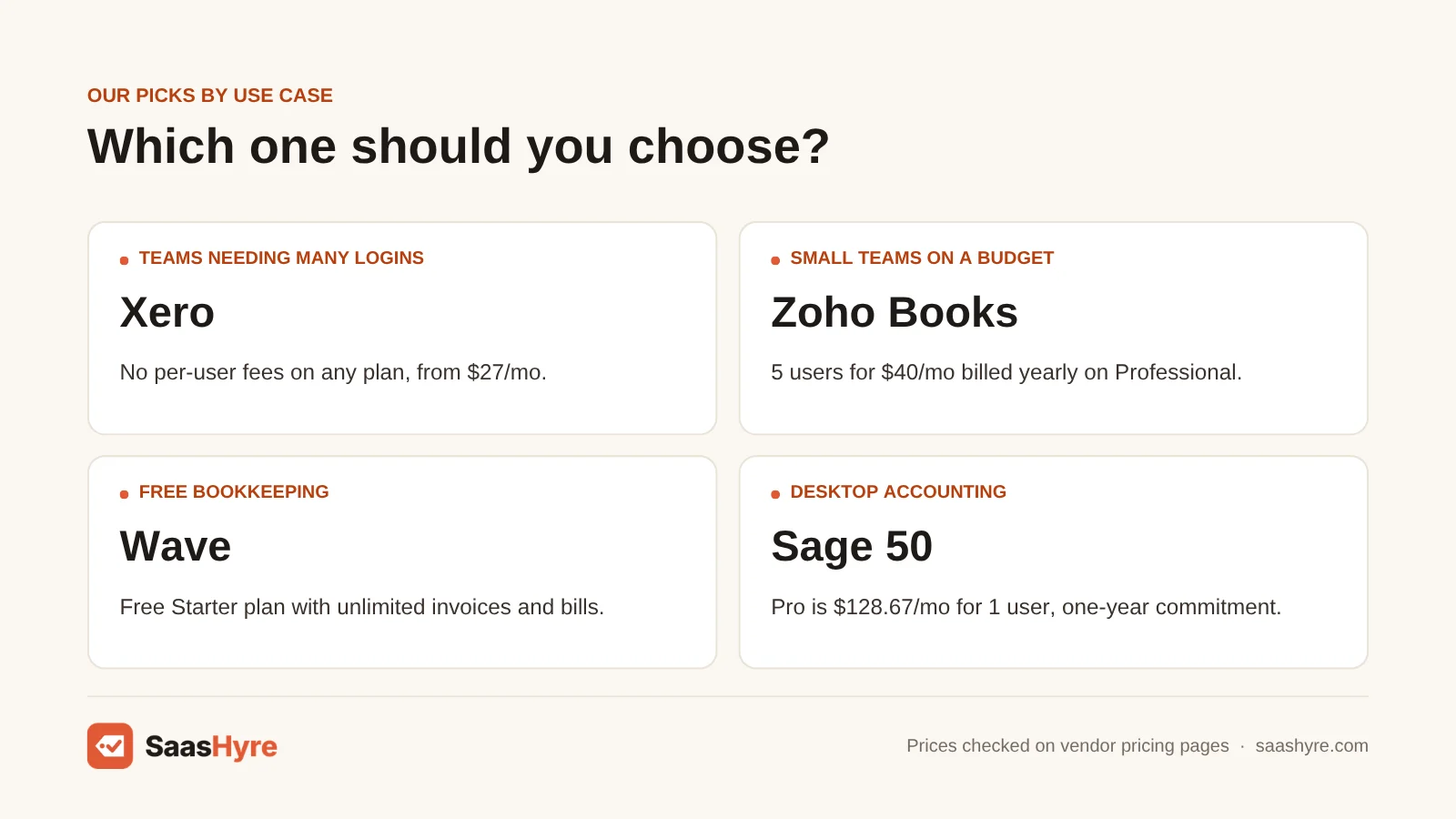
Xero is the best overall QuickBooks alternative. Every plan lets you add as many users as you want at no extra cost. Plans cost $27, $59 or $97 a month. The Growing plan at $59 gives you unlimited invoices and bills, which makes it far cheaper than QuickBooks Plus for a growing team.
1 Xero: Best for teams that need many logins
If you want QuickBooks-level bookkeeping without paying more for each new user, start here.
What it does well. Xero covers the same core jobs as QuickBooks. You can send invoices, pay bills, reconcile your bank and run reports. The big difference is that Xero never charges per user. It also forecasts cash flow, from 30 days on Early to 180 days on Established.
Key features:
- No per-user fees on any plan
- Bank reconciliation and online invoice payments
- Smart document capture for bills and receipts
- Cash flow forecast up to 180 days
- Multiple currencies and project tracking on Established
Pricing. Early is $27 a month, with 20 invoices and 5 bills. Growing is $59 a month, with unlimited invoices and bills. Established is $97 a month and adds multiple currencies and project tracking. Xero only lists monthly billing. New US customers get 80% off for the first 3 months. That makes the plans $5.40, $11.80 and $19.40 a month for those 3 months. Xero can change the offer at any time, so check it before you buy. Payroll through Gusto costs $36 a month plus $6 per person. See Xero pricing.
Best for: You, if more than a few people need access to your books, or your accountant already likes Xero.
Limitations. The Early plan’s 20-invoice cap is tight for a busy business. Auto-reconcile on Early costs $5 a month extra. Payroll is an add-on, not built in. And some US bookkeepers know QuickBooks better, so ask yours first.
Best Budget QuickBooks Alternative
Zoho Books is the cheapest full accounting tool on this list. The free plan works if your revenue stays under $50,000 a year. Paid plans start at $15 a month billed yearly for 3 users. The Professional plan gives 5 users for $40 a month billed yearly, less than a third of QuickBooks Plus.
2 Zoho Books: Best for low cost and more users
If you want real double-entry books at a low price, Zoho Books gives you the most for the money.
What it does well. Zoho Books covers invoices, bills, bank feeds and sales tax. Higher plans add inventory, project profit tracking and budgets. The free plan is real accounting, not a trial, and even includes bank reconciliation.
Key features:
- Free plan for businesses under $50K a year
- Bank feeds and sales tax tracking
- Inventory and project profit tracking on Professional
- Budgets and cash flow forecasts on Premium
- Amazon, eBay and Etsy links on Elite
Pricing. The free plan covers 1 user plus your accountant and up to 1,000 invoices a year. Standard is $15 a month billed yearly, or $20 monthly, for 3 users. Professional is $40 yearly or $50 monthly for 5 users. Premium is $60 or $70 for 10 users. Elite is $120 or $150. Ultimate is $240 or $275 for 15 users. Extra users cost $2.50 a month billed yearly, or $3 monthly. Paid plans come with a 14-day free trial. See Zoho Books pricing.
Best for: You, if you run a small team on a tight budget and want real accounting, not just invoices.
Limitations. Every plan has a yearly cap on invoices and expenses, from 1,000 on Free to 100,000 on the top plans. Fewer US accountants use it than QuickBooks. And you get the best value if you also use other Zoho apps.
Best Free QuickBooks Alternatives
Wave is the best free QuickBooks alternative. Its Starter plan gives you unlimited invoices, estimates, bills and bookkeeping records for $0. Akaunting is the best free pick if you want open-source software you can run on your own server. Both beat the new QuickBooks Free plan, which caps you at 2 invoices a month.
3 Wave: Best for free invoicing and bookkeeping
If you run a one-person business and want to pay nothing, Wave covers the basics.
What it does well. Wave’s free plan has no cap on invoices, estimates or bills. You can take card payments online and send invoices from the mobile app. Pro adds bank imports and auto-sorting of transactions. It also adds branded invoices and late payment reminders.
Key features:
- Unlimited invoices, estimates and bills for free
- Online card payments
- Auto-import bank transactions on Pro
- Late payment reminders on Pro
- Payroll and bookkeeping help as add-ons
Pricing. Starter is free. Pro is $19 a month, or $190 a year. New Pro users can get $9.50 a month for the first 3 months. Card payments cost 2.9% plus $0.60 each. On Pro, the first 10 card payments each month cost 2.9% with no fixed fee. Receipt scanning is an add-on from $8 a month. Payroll starts at $25 a month. Wave Advisors bookkeeping starts at $149 a month. See Wave pricing.
Best for: You, if you are a freelancer or solo owner who wants free invoicing and simple books.
Limitations. The free plan does not connect to your bank, so you type in transactions by hand. Receipt scanning costs extra. It is built for very small businesses, so it will not replace QuickBooks for a team with inventory.
4 Akaunting: Best for open source and self-hosting
If you want to own your data and run the software on your own server, Akaunting is the free open-source pick.
What it does well. Akaunting’s self-hosted Standard plan is free, and the source code is open. You get invoicing, expense tracking, cash flow views and a client portal. If you would rather not run a server, the cloud plans are cheap. Even the Premium cloud plan covers 10 users.
Key features:
- Free, open-source self-hosted version
- Invoicing and expense tracking
- Client portal for invoices and payments
- Bank feeds and double-entry on Premium
- Payroll, projects and inventory on Elite
Pricing. The self-hosted Standard plan is free. Cloud Standard is $12 a month, or $8 billed yearly, for 1 user plus an accountant. Premium is $36, or $24 yearly, for 10 users. Elite is $84, or $56 yearly, for 30 users. Ultimate is $218, or $145 yearly, with unlimited users. Cloud plans offer a free trial of unstated length. See Akaunting pricing.
Best for: You, if you are handy with servers or want low-cost cloud books for a big team.
Limitations. Self-hosting means you handle setup, updates and backups. Bank feeds and double-entry start on the Premium cloud plan. Few US accountants know it, so plan to do more on your own.
Best QuickBooks Alternative for Freelancers
FreshBooks is the best QuickBooks alternative for freelancers and service businesses that bill clients all day. It adds proposals, retainers and time-based billing. Lite costs $23 a month at the regular price, and the pricing page showed $1 a month for the first year when I checked. Every plan has a 30-day money-back guarantee.
5 FreshBooks: Best for client billing
If most of your day is billing clients and chasing payments, FreshBooks makes that part easy.
What it does well. FreshBooks is built around invoices. You can send estimates, proposals and retainers, and take cards, ACH, Apple Pay and Google Pay. Plus adds double-entry reports, bank reconciliation and accountant access. Premium adds project profit tracking and automatic client emails.
Key features:
- Estimates, proposals and client retainers
- Card, ACH, Apple Pay and Google Pay payments
- Receipt scanning and e-signatures on Plus
- Project profit tracking on Premium
- Accountant access on Plus and up
Pricing. Lite is $23 a month for 5 billable clients. The promo was $1 a month for the first year. Plus is $43 a month for 50 clients, with a promo of 80% off for 3 months ($8.60). Premium is $70 a month for unlimited clients, or $14 a month for 3 months on promo. Select is custom priced. Each extra team member is $11 a month. Yearly billing takes an extra 10% off. There is a 30-day free trial and a 30-day money-back guarantee. See FreshBooks pricing.
Best for: You, if you are a freelancer, consultant or agency that bills clients for time and projects.
Limitations. Client caps are tight on lower plans. Lite covers only 5 clients and Plus only 50. Each team member costs $11 a month, so costs climb fast as you hire. Inventory and deeper accounting are weaker than in QuickBooks or Zoho Books.
Best QuickBooks Alternatives for Growing Businesses
Odoo is the best pick if you want accounting plus sales, inventory and more in one system. One app is free for unlimited users, and Standard costs $24.90 per user a month for the first year on yearly billing. NetSuite fits fast-growing firms with many entities, but it does not publish prices.
6 Odoo: Best all-in-one business system
If you want your books, sales and stock in one place, Odoo can replace several tools at once.
What it does well. Odoo is a set of business apps that share one database. Accounting is one app. Others cover CRM, sales, inventory and eCommerce. One App Free lets you use one app with unlimited users for $0, hosted free on Odoo Online.
Key features:
- One app free for unlimited users
- Accounting, CRM, inventory and eCommerce apps
- Free hosting on Odoo Online
- Custom plan for custom features
Pricing. One App Free is $0 for unlimited users on one app. Standard is $31.10 per user a month on monthly billing. On yearly billing it is $24.90 per user a month. That discount lasts 12 months and covers only the users you first order. Custom is $46.80 per user a month, or $37.40 on yearly billing, with the same first-year discount. No free trial is listed on the pricing page. See Odoo pricing.
Best for: You, if you want accounting and inventory or sales in one system, or you only need one app for free.
Limitations. Setup takes more work than QuickBooks. The per-user price adds up once you pass the free one-app plan. And the yearly discount ends after 12 months, so plan for the $31.10 rate.
7 NetSuite: Best for fast-growing, multi-company firms
If you have outgrown QuickBooks Advanced and run more than one company, NetSuite is the big step up.
What it does well. NetSuite is Oracle’s cloud ERP. It joins accounting with billing, inventory and orders. It suits businesses with many entities and bigger finance teams. You add modules as you grow.
Key features:
- Cloud financial management and accounting
- Subscription billing with SuiteBilling
- Order and inventory management
- Optional modules you add as you grow
Pricing. NetSuite does not publish prices. It sells an annual license that covers the core platform. The final price depends on how many users and which optional modules you need. You have to ask sales for a quote. See how NetSuite pricing works.
Best for: You, if you run several companies, have a finance team and need one system for all of it.
Limitations. There is no public price, no free plan and no self-serve trial. You sign up for a yearly license. Setup is a real project. It is far more than most small businesses need.
Best QuickBooks Desktop Alternative
Sage 50 is the best pick if you want desktop accounting now that new US buyers can’t get QuickBooks Desktop Pro Plus or Premier Plus. Pro Accounting is $128.67 a month for 1 user, with a one-year commitment. There is no trial, but you get a full refund within 30 days.
8 Sage 50: Best for desktop accounting
If you like software on your own computer, Sage 50 is the closest swap for QuickBooks Desktop.
What it does well. Sage 50 is desktop accounting with cloud links. Pro covers invoices, expenses, bank reconciliation, inventory and jobs. Premium adds multiple companies, advanced budgets and serial number tracking. Quantum adds role-based permissions and workflow tools.
Key features:
- Desktop software with cloud links
- Inventory and job tracking on Pro
- Multiple companies on Premium
- Role-based permissions on Quantum
- Payroll bundles available
Pricing. Pro Accounting is $128.67 a month for 1 user. Premium Accounting is $182.50 a month, with 1 to 5 users to choose from. Quantum Accounting is $271.17 a month. Every plan needs a one-year commitment. Sage also lists bundles with payroll, starting at $1,120 a year for Pro with Payroll. There is no free trial, but you can get a full refund within 30 days of your first purchase. See Sage 50 pricing.
Best for: You, if you want desktop accounting with inventory and job tracking and don’t mind a yearly contract.
Limitations. Its starter plan costs more than any cloud tool here. The one-year commitment locks you in. And the pricing page does not make clear how price changes with users, so ask first.
Tools We Left Out, and Why
You will see these on other lists. Here is why we skipped them.
- Sage Accounting (cloud). We could not find a US price for it on Sage’s own site.
- Bench. Some lists still show it. We left it out because we could not confirm a current offer on its own site.
- Sage Intacct. It is sold by quote, and NetSuite already covers that level here.
What a 5-Person Team Pays in a Year
For a team of five at regular prices, QuickBooks Online Plus costs $1,680 a year. Xero Growing costs $708, and Zoho Books Professional costs $480 on yearly billing. Akaunting Premium cloud costs $288. FreshBooks Premium with 4 extra team members costs $1,368. Odoo Standard costs $1,494 in the first year.
This uses regular prices, not promos, and leaves out taxes, payroll and payment fees.
| Tool and plan | Price used | 5 people for a year |
|---|---|---|
| QuickBooks Online Plus (5 users) | $140/mo | $1,680 |
| Xero Growing (no per-user fee) | $59/mo | $708 |
| Zoho Books Professional (5 users) | $40/mo, billed yearly | $480 |
| Akaunting Premium cloud (10 users) | $24/mo, billed yearly | $288 |
| FreshBooks Premium + 4 team members | $70 + (4 x $11) = $114/mo | $1,368 |
| Odoo Standard (5 users, first year) | $24.90/user/mo, billed yearly | $1,494 |
Watch Odoo after year one. At the $31.10 rate, the same 5 users cost $1,866 a year. And if you pay Zoho Books monthly, Professional costs $600 a year instead of $480.
How to Choose a QuickBooks Alternative

- Price the regular rate, not the promo. Many deals only last 3 to 12 months. Multiply the full monthly price by 12 to see your real yearly cost.
- Count your users. Xero has no per-user fees. QuickBooks, FreshBooks and Odoo charge more as you add people.
- Check invoice and client caps. Xero Early allows 20 invoices, FreshBooks Lite 5 clients and QuickBooks Free 2 invoices a month.
- Ask your accountant first. A tool your accountant already knows will save you time and fees at tax time.
- Plan the data move. Ask each vendor how it imports your QuickBooks lists and history before you switch.
- Add payroll and payment fees. Payroll is often an add-on, like Xero’s $36 a month plus $6 per person through Gusto.
How We Evaluated These Tools
We compared each tool using its own pricing page, feature pages and help docs, checked in October 2026. We also read the top-ranking reviews of QuickBooks alternatives to find what they got wrong or left out. We looked at regular and promo prices, users per plan, free plan limits, trials and refunds, and how each tool fits different business types. We did not run our own accounting tests, and feature claims come from the vendors. No vendor pays to be listed. Read our editorial policy to learn more. If AI features matter most to you, see our guide to the best AI accounting software.
Keep comparing: SaaS guides · Best AI Bookkeeping Software · AI Invoicing Software
The Bottom Line
If you want one tool to replace QuickBooks, get Xero. It covers the same core jobs and never charges per user. If cost matters most, use Zoho Books. If you want free, use Wave, or Akaunting if you want to host it yourself. Freelancers who bill clients all day should pick FreshBooks. If you want accounting, sales and stock in one place, try Odoo, and move to NetSuite once you run several companies. And if you want desktop software, Sage 50 is the closest swap for QuickBooks Desktop.
Frequently Asked Questions
What is the best alternative to QuickBooks?
Xero is the best alternative for most small businesses. It covers invoicing, bills, bank reconciliation and reports, and it never charges per user. Plans cost $27, $59 or $97 a month. If cost matters more, Zoho Books starts at $15 a month billed yearly and has a free plan.
Is there a free alternative to QuickBooks?
Yes. Wave’s Starter plan is free with unlimited invoices, estimates and bills. Zoho Books is free if your revenue stays under $50,000 a year. Akaunting is free to self-host, and Odoo gives you one app free for unlimited users. QuickBooks now has a free plan too, but it allows only 2 invoices a month.
Is Xero cheaper than QuickBooks?
Usually, yes. Xero Early is $27 a month compared with $38 for QuickBooks Simple Start at regular prices. The gap grows with users. Xero has no per-user fees, while QuickBooks Plus costs $140 a month for 5 users. For five people, that is $708 a year on Xero Growing against $1,680 on QuickBooks Plus.
How much does QuickBooks Online cost?
At regular prices, Simple Start is $38 a month, Essentials is $85, Plus is $140 and Advanced is $340. When I checked, new users could get 50% off for the first 3 months. There is also a free plan for 1 user with 2 invoices a month, and a 30-day free trial.
What is the best QuickBooks alternative for freelancers?
FreshBooks is the best pick for freelancers who bill clients. It has proposals, retainers and many ways to get paid. Lite costs $23 a month for 5 clients at the regular price. If you want free, Wave gives you unlimited invoices on its Starter plan at no cost.
Is QuickBooks Desktop being discontinued?
Intuit stopped selling new US subscriptions to QuickBooks Desktop Pro Plus, Premier Plus and Mac Plus after September 30, 2024. Intuit said current subscribers keep getting updates and support. If you are new and want desktop accounting, Sage 50 is a close swap, starting at $128.67 a month.
Can I move my data from QuickBooks to another tool?
Yes, but the steps differ by tool. FreshBooks Select includes a data move service called Easy Switch. For the others, ask the vendor how it imports your customers, vendors and history. Plan the move for the start of a month or quarter. And keep a backup of your QuickBooks file.
Which QuickBooks alternative is best for inventory?
Zoho Books tracks inventory from its Professional plan at $40 a month billed yearly, and Elite adds advanced inventory control. Odoo has a full inventory app. Sage 50 tracks inventory on every plan. Wave and FreshBooks are weaker here, so skip them if you sell physical products.